Yes, you can self-host ERPNext on your own private cloud infrastructure or on-premise physical servers because it is fully open-source under the GNU General Public License (GPLv3). Self-hosting gives growing businesses 100% data sovereignty, custom database control, and zero recurring user license fees. However, successfully deploying, securing, and maintaining an enterprise-grade ERP architecture demands dedicated DevOps resources, rigorous backup regimens, and deep Frappe framework expertise. If your organization wants total infrastructure control without the operational overhead, partnering with an established implementation specialist like Duocron Solution ensures your ERPNext ecosystem is custom-architected, security-hardened, and optimized for high-volume enterprise performance.
What Does It Mean to Self-Host ERPNext?
When business leaders ask, "Can I self host ERPNext?", they are usually evaluating how to balance digital autonomy with cost efficiency.
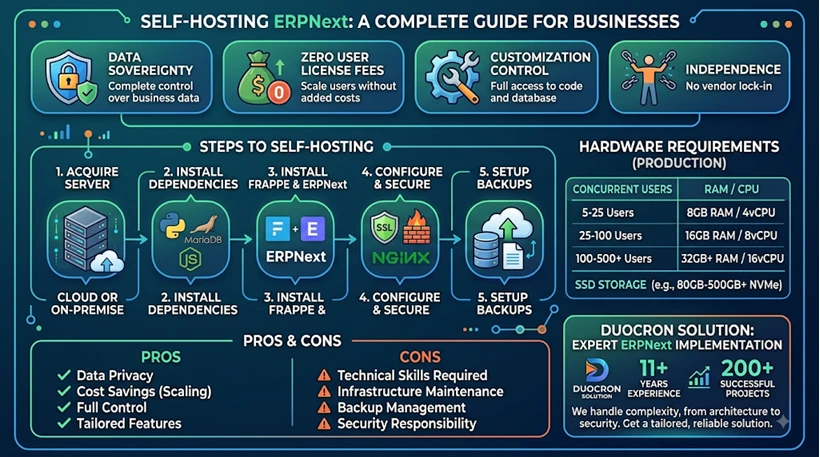
Self-hosting ERPNext means installing, deploying, and managing the open-source Frappe framework, the ERPNext application layer, and its database dependencies on your own infrastructure. Instead of subscribing to a multi-tenant software-as-a-service (SaaS) package where the vendor controls server configurations and upgrade cycles, your internal IT team or designated technical partner assumes responsibility for:
Provisioning and sizing server hardware (vCPU, RAM, NVMe/SSD storage, and network bandwidth).
Configuring the open-source software stack (Ubuntu LTS, Python, MariaDB database engine, Redis caches, Node.js, and Nginx reverse proxy).
Maintaining application security (SSL/TLS certificate renewal, firewall rules, automated off-site backups, and vulnerability patching).
Managing Frappe Bench commands (bench update, database migrations, and major release version upgrades).
Self-hosting provides complete control over your source code, direct root access to your database, and unlimited customization potential. At the same time, it shifts entire operational and reliability responsibilities directly onto your organization.
Hardware and Software Requirements: Can I Self Host ERPNext Reliably?
ERPNext is a high-productivity framework powered by Python, MariaDB, and Redis. Because it handles intensive transactional workloads—such as batch manufacturing tracking, multi-level Bills of Materials (BOM), automated ledger postings, and real-time inventory adjustments—deploying it on under-provisioned infrastructure leads to slow page loads, worker process timeouts, and database lockups.
Recommended Production Hardware Specifications
To ensure smooth operations across your organization, match your deployment tier to your concurrent user base and daily transaction volume:
| Deployment Size | Concurrent Users | CPU / Processor | RAM / Memory | Fast SSD Storage | Recommended Target Architecture |
| Small Business | 5 – 25 Users | 4 vCPU | 8 GB – 16 GB | 80 GB – 150 GB NVMe | Single Cloud VPS (AWS EC2, DigitalOcean, or Hetzner) |
| Mid-Market Enterprise | 25 – 100 Users | 8 vCPU | 16 GB – 32 GB | 250 GB – 500 GB SSD | Dedicated App Server + Dedicated MariaDB Database Server |
| Large-Scale / Manufacturing | 100 – 500+ Users | 16+ vCPU | 64 GB – 128 GB | 1 TB+ Scalable Block Storage | Multi-Node Cluster, Load Balancer, Dedicated Redis, Read-Replicas |
Software Stack Prerequisites
Setting up a resilient self-hosted ERPNext environment requires specific software versions and dependencies:
Operating System: Ubuntu 22.04 LTS or Ubuntu 24.04 LTS (64-bit recommended).
Database Management System: MariaDB 10.6+ (configured with Barracuda format and utf8mb4 character set).
Application Runtime: Python 3.10+ / 3.11+ and Node.js 18+ / 20+ LTS along with Yarn package manager.
In-Memory Caching and Message Broker: Redis (separate instances for cache, queue, and socketio).
Web Server & Reverse Proxy: Nginx (configured with Gzip compression, WebSocket proxying, and SSL termination).
Background Worker Management: Supervisor or systemd worker daemons running Celery / Python background workers for automated email triggers, scheduled reports, and queue execution.
Real Cost Analysis: The True Cost of Self-Hosting ERPNext
One of the most pervasive myths in enterprise software is that open-source software is completely free. While ERPNext eliminates per-user recurring license fees entirely, self-hosting introduces distinct infrastructure and operational expenditures.
Understanding the Total Cost of Ownership (TCO) requires evaluating both visible infrastructure costs and hidden operational costs.
1. Direct Cloud Infrastructure Costs
Your recurring hosting bill depends on your chosen infrastructure provider:
Budget VPS (Hetzner, Linode, Vultr): $25 to $90 per month (approx. ₹2,000 to ₹7,500/mo) for single-instance compute with moderate redundancy.
Tier-1 Cloud Providers (AWS, Microsoft Azure, Google Cloud): $150 to $650 per month (approx. ₹12,000 to ₹50,000/mo) when deploying managed databases (like AWS RDS), automated EBS snapshots, VPC private subnets, and multi-zone failovers.
On-Premise Physical Servers: $3,500 to $12,000 upfront capital expenditure for enterprise server hardware, high-speed uninterruptible power supply (UPS) systems, hardware firewalls, and dedicated cooling.
2. DevOps and System Administration (The Hidden Expense)
Deploying the software is only the first step. Maintaining an active enterprise ERP system requires consistent engineering time:
System Patching and OS Maintenance: 4 to 8 hours monthly to apply security updates, monitor disk usage, optimize MariaDB slow queries, and adjust Nginx buffers.
Frappe Bench Upgrades: ERPNext releases regular minor bug fixes and major annual upgrades. Running major schema migrations without dedicated expertise risks custom script breakage and unexpected downtime.
Internal DevOps Labor: An in-house Linux administrator or DevOps engineer costs between $50,000 and $110,000 annually (or ₹6,00,000 to ₹18,00,000/year).
3. Business Impact of Misconfigured Hosting
Consider a real-world case: A mid-sized precision parts manufacturer decided to self-host ERPNext on a bare-bones virtual server to save operational costs. During month-end financial closing, concurrent invoice generation overwhelmed the shared MariaDB memory pool. The server crashed, locking up the assembly line's dispatch module for 14 hours.
The direct compute savings of $80 per month were wiped out by over $18,000 in delayed shipments, overtime labor, and customer friction.
Self-hosting is exceptionally cost-effective—provided your infrastructure architecture, process isolation, and database caching are designed by ERP engineering veterans who understand industrial load patterns.
Pros and Cons: Weighing Your Deployment Strategy
Evaluating whether to self-host ERPNext requires comparing operational flexibility against system administration overhead.
The Advantages of Self-Hosting ERPNext
Absolute Data Sovereignty and Privacy: Your proprietary business data, financial records, client lists, and intellectual property remain entirely under your physical or virtual control. This is critical for organizations operating under strict regulatory compliance frameworks (such as GDPR, HIPAA, or ISO 27001).
Zero Per-User Licensing Fees: Traditional enterprise systems (such as SAP Business One or NetSuite) charge $100 to $250 per user each month. ERPNext lets you scale from 20 users to 2,000 users without incurring incremental software license penalties.
Unrestricted Code and Database Customization: Direct SSH and database access allows you to build deeply tailored custom Frappe apps, write direct server-side hooks, configure custom Redis pipelines, and integrate specialized legacy machinery or third-party APIs without sandbox restrictions.
Tailored Infrastructure Scalability: You decide when to upgrade CPU cores, expand RAM, or add read-only database replicas to accommodate peak seasonal sales spikes.
The Challenges of Self-Hosting ERPNext
DevOps Dependency: You must have seasoned Linux system administrators on call who understand Python environments, MariaDB indexing, Gunicorn worker threads, and Frappe internals.
Backup and Disaster Recovery Risks: If automated off-site backups fail and local storage corrupts, data recovery falls entirely on your internal IT team.
Upgrade and Migration Complexities: Major version transitions (e.g., migrating from v14 to v15 or v16) involve database schema transformations. Without proper staging pipelines, unmanaged updates can break custom server scripts and workflow hooks.
Security Hardening Responsibilities: You are solely responsible for configuring Web Application Firewalls (WAF), blocking DDoS attacks, preventing SQL injections, and managing SSL certificate lifecycles.
Step-by-Step Architecture for a Production-Grade Self-Hosted Setup
Setting up a reliable self-hosted ERPNext environment goes far beyond running a standard installation script. A production deployment requires a multi-layer architecture designed for high availability and zero data loss.
Layer 1: Edge Security and Reverse Proxy
Never expose ERPNext's internal application port (8000) directly to the public internet.
Nginx Reverse Proxy: Route all incoming HTTP/HTTPS requests through Nginx. Configure secure TLS 1.3 encryption, disable outdated SSL ciphers, and set strict HTTP response headers (X-Frame-Options, X-Content-Type-Options, and Strict-Transport-Security).
Rate Limiting and Firewall: Use tools like fail2ban and cloud-level firewalls (AWS Security Groups or Cloudflare WAF) to block brute-force authentication attacks against your /login endpoint.
Layer 2: The Application and Worker Tier
ERPNext divides operational labor between real-time web requests and background asynchronous jobs:
Gunicorn WSGI Process Manager: Manages multiple Python worker threads to serve synchronous user interface requests without thread starvation.
Redis Queue Workers: Handles asynchronous task queues (Default, Short, and Long workers) for background processing, such as sending bulk emails, computing complex inventory valuations, and processing heavy ledger reports.
Node.js Socket.io: Powers real-time in-app notifications, live document editing indicators, and instant chat updates across connected users.
Layer 3: Database Engine and Caching Optimization
The MariaDB database is the heart of your ERPNext system. Default MariaDB configurations are insufficient for enterprise transactional volume:
InnoDB Buffer Pool Sizing: Allocate 50% to 70% of your server’s total RAM to innodb_buffer_pool_size so frequently queried transactional tables remain cached in memory.
Connection Pooling: Tune max_connections and set realistic query timeouts to prevent deadlocks during high-concurrency operations.
Redis Cache: Maintain a dedicated Redis instance strictly for session caching and metadata caching to minimize direct database queries.
Layer 4: Automated Disaster Recovery Pipelines
A backup plan that has not been tested for restoration is not a backup plan.
Automated Daily and Hourly Snapshots: Implement automated cron routines using bench backup --with-files.
Off-Site Cloud Storage Synchronization: Automatically push encrypted SQL dumps and private user attachments to an external, immutable object storage bucket (such as Amazon S3, Google Cloud Storage, or Backblaze B2).
Scheduled Recovery Drills: Conduct quarterly mock restoration drills on an isolated staging server to verify data integrity and establish a reliable Recovery Time Objective (RTO).
Managed Hosting vs. Self-Hosting: Decision Matrix
To help your leadership team determine the best operational approach, compare self-hosting against managed enterprise solutions:
| Operational Dimension | Basic DIY Self-Hosting | Official Frappe Cloud | Enterprise Managed Implementation (Duocron Solution) |
| Software License Cost | $0 (GPLv3 Open Source) | $0 (Open Source Core) | $0 (Open Source Core) |
| Server Administration | 100% Internal IT Team | Automated by Frappe Cloud | Fully Managed by Duocron ERP Specialists |
| Custom App & Code Freedom | Unlimited | Restricted on shared tiers | Unlimited Customization & Tier-1 Features |
| Data Residency Control | Full Control (Your Servers) | Multi-region Cloud | Dedicated Private Cloud or On-Premise |
| Complex Business Workflows | Self-Configured | Self-Configured | Custom Tailored for Mid-to-Large Enterprises |
| Disaster Recovery SLA | No SLA (Self-Managed) | Standard Cloud Snapshots | Enterprise-Grade SLA with Tested Failovers |
| Implementation Risk | High | Moderate | Low (Engineered for Zero Downtime) |
When Does Self-Hosting Make Strategic Sense?
Self-hosting ERPNext is an ideal strategic choice if your organization fits one of the following profiles:
You Have Dedicated In-House Linux DevOps Talent: Your team is already comfortable managing Linux servers, containerized environments, database clustering, and security monitoring.
You Operate in a Highly Regulated Industry: Defense contractors, financial institutions, healthcare networks, and government agencies that are legally barred from storing records on public multi-tenant clouds benefit from private cloud isolation.
You Require Deep, Low-Latency Hardware Integrations: Manufacturing plants that connect ERPNext directly with automated PLCs, shop-floor IoT sensors, SCADA systems, or weighbridges benefit from on-premise local area networks (LAN).
You Want to Transform ERPNext into an Enterprise Engine: Mid-market to large enterprises looking to replace high-cost platforms like SAP, Microsoft Dynamics 365, or Oracle with an agile, customized ERP architecture tailored specifically to their workflows.
Conclusion: Transform ERPNext into a Tier-1 Enterprise Engine with Duocron Solution
Can you self-host ERPNext? Absolutely. But deploying an enterprise ERP system involves far more than running server installation scripts. It requires crafting a secure, resilient, high-speed ecosystem that powers your core business processes without interruption.
That is where Duocron Solution steps in.
With over 11+ years of deep industry experience and 200+ successful ERP implementations across global markets, Duocron Solution is recognized as a premier ERPNext implementation and technical consulting partner. We have engineered mission-critical ERP architectures for complex government initiatives, high-volume process manufacturing plants, logistics networks, and international trade corporations.
Our engineering team customizes and hardens ERPNext to bridge the gap between open-source agility and Tier-1 enterprise capabilities. We tailor workflows, build custom Frappe applications, optimize high-concurrency database clusters, and deliver seamless system integrations—making ERPNext a powerful, cost-effective fit for mid- to large-scale enterprises.
Whether you choose a secure private cloud, an on-premise high-availability cluster, or a fully managed hybrid infrastructure, Duocron Solution provides end-to-end implementation, custom development, data migration, and 24/7 mission-critical support.
Ready to modernize your enterprise operations with a fully customized, high-performance ERPNext deployment? Connect with the experts at Duocron Solution today to schedule your architectural consultation.
Frequently Asked Questions
Can I self host ERPNext on my own local office server?
Yes, you can install and run ERPNext on a local physical server connected to your office local area network (LAN). This setup ensures total data privacy and eliminates recurring cloud hosting fees. However, running an on-premise server requires reliable power backups (UPS), redundant internet connections, hardware maintenance, and secure VPN routing for remote workers. To ensure your on-premise architecture is secure and reliable, Duocron Solution provides end-to-end hardware sizing, setup, and maintenance support.
Is self-hosting ERPNext completely free for businesses?
While the ERPNext software license is 100% free under the open-source GPLv3 license, self-hosting is not entirely expense-free. You will still have direct costs for cloud infrastructure or physical servers, along with the operational expense of server security, automated off-site backups, and ongoing database maintenance. Duocron Solution helps businesses minimize their total cost of ownership by designing optimized server architectures and providing expert ongoing support that prevents expensive downtime.
How much RAM and CPU do I need to run ERPNext smoothly?
For a small team of 5 to 25 users, ERPNext runs smoothly on a server with 4 vCPUs, 8 GB to 16 GB of RAM, and fast SSD/NVMe storage. For mid-sized to large enterprises with 50 to 500+ concurrent users running intensive manufacturing and accounting workflows, we recommend scaling to 16+ vCPUs and 32 GB to 64 GB+ RAM with a separate, dedicated database server. Duocron Solution provides custom capacity planning to ensure your infrastructure scales seamlessly as your business grows.
What happens when a new ERPNext major version is released?
When a major release is launched, self-hosted instances must be upgraded manually using Frappe Bench commands. Because major upgrades update core database schemas and Python dependencies, unmanaged updates can break custom scripts or third-party integrations. Duocron Solution manages version upgrades safely by testing all custom apps in isolated staging environments before deployment, ensuring zero downtime and complete data integrity.
Why should our company choose Duocron Solution instead of doing a DIY installation?
While standard installation scripts make basic setup straightforward, configuring ERPNext for complex enterprise operations—such as multi-currency accounting, advanced manufacturing BOMs, custom approvals, and high-volume database loads—requires seasoned ERP architects. Duocron Solution brings 11+ years of technical experience and over 200 successful global deployments to customize ERPNext into a robust enterprise engine that rivals Tier-1 commercial systems.
Related Articles:
How to Find Certified ERPNext Implementation Experts Near You: The Complete Guide
Finding the Right ERPNext Partner in Deutschland for Sustainable Business Growth
ERPNext Partner in Toronto: The Complete Enterprise Implementation and Digital Transformation Guide
Top ERPNext Implementation Partner in Riyadh: Scale Your Saudi Enterprise with ERPNext
ERPNext Implementation Partner in Bahrain: Your Complete Enterprise Guide
Top ERPNext Implementation Partner in Dubai: Complete 2026 Guide to Selecting the Right Partner
ERPNext Partner UAE: The Complete Enterprise Implementation Guide
Selecting the Right Partner for Your ERPNext Implementation Hyderabad
ERPNext Partner in Ahmedabad: Complete Implementation Guide to Build a Profit Powerhouse
ERPNext Implementation Partner in Delhi: How to Choose the Right Implementation Partner in 2026
Best ERPNext Implementation Partner in Bangalore: The Definitive Enterprise Guide for 2026
ERPNext Implementation Partner Guide 2026: Who is the Best ERPNext Vendor?
What Are ERPNext Implementation Services and Who Provides the Best?
ERPNext Modules Explained: Complete Guide to Features & Business Functions
Companies Using ERPNext: Industries, Examples & Use Cases
Odoo vs ERPNext: Which ERP Is Better for Your Business?
ERPNext Partner vs Direct ERPNext Support: Which Should You Choose?
ERPNext Customization Companies & Services in India: Complete Enterprise Guide
Top ERPNext Implementation Companies for Manufacturing: Complete Industry Guide
ERPNext Implementation Guide: Process, Timeline & Best Practices
ERPNext Implementation Cost in India: Complete Pricing Guide
How to Choose the Best ERPNext Implementation Partner: Complete Checklist
Top ERPNext Service Providers & Partners in India (2026)
ERPNext Certified Partner: What Certification Means & Why It Matters
Author Bio

Aarav Sharma
Aarav Sharma is an ERPNext Consultant at DuoCron Solutions specializing in manufacturing ERP and process optimization. Outside work, Aarav enjoys exploring new technology trends and writing about digital transformation in manufacturing.