Modern logistics operations rarely run on a single software system. A company may use an ERP for finance and business management, a WMS for warehouse execution, a TMS for transportation planning, several carriers for delivery, and 3PL partners for outsourced logistics activities.
The challenge is making these systems work together.
ERP logistics integration connects the ERP with external logistics systems so that orders, inventory, shipment information, delivery updates, invoices, and other operational data can move between platforms without repeated manual entry. This creates a connected flow from order creation to warehouse processing, transportation, delivery, and financial settlement.
DuoCron ERP can act as a central business platform while connecting with WMS, TMS, carrier systems, and 3PL partners through integration workflows and APIs. Its configurable architecture allows businesses to build integrations around their actual logistics processes instead of creating isolated data silos.
What Is ERP Logistics Integration?
ERP logistics integration is the process of connecting an ERP system with the external platforms and partners involved in logistics operations.
These connections allow systems to exchange information automatically.
For example, when a customer places an order, the ERP can send order information to a WMS. Once the order is packed, the WMS can send fulfillment details back to the ERP. The shipment can then move to a TMS or carrier platform, where transportation information is generated and returned to the ERP.
The overall flow may look like this:
Customer Order → ERP → WMS → TMS/Carrier → Delivery → ERP → Billing
If a 3PL manages the warehouse or transportation activity, the flow can also include the 3PL platform.
The goal is not simply to connect software.
The goal is to create a reliable flow of business information across the logistics network.
Why Is ERP Logistics Integration Important?
Without integration, logistics teams often spend time moving information between systems manually.
An employee may download an order file from the ERP and upload it into the WMS. Another employee may copy shipment details into a carrier portal. Delivery information may later be entered into the ERP manually.
This creates several problems.
Duplicate data entry
The same information may need to be entered into multiple applications.
This increases administrative work and creates opportunities for errors.
Delayed information
If shipment or delivery information is updated manually, the ERP may not have the latest status.
This can affect customer service, billing, inventory visibility, and management reporting.
Data inconsistencies
Different systems may contain different versions of the same order, customer, inventory, or shipment record.
For example, an ERP may show an order as dispatched while the carrier system still shows it as pending pickup.
Difficult reconciliation
Finance and operations may need to compare information from several systems before confirming what actually happened.
Integration reduces the need for this manual reconciliation.
What Systems Should a Logistics ERP Connect With?
There is no universal integration architecture for every logistics company.
The right connections depend on how the business operates.
However, four integration areas are particularly important:
- Carriers
- TMS platforms
- WMS platforms
- 3PL partners
Each connection serves a different purpose.
| Integration | Main Purpose | Typical Data Exchange |
|---|---|---|
| ERP + Carrier | Shipment and delivery coordination | Shipment details, tracking, delivery status, freight information |
| ERP + TMS | Transportation planning and execution | Orders, loads, routes, carriers, shipment status |
| ERP + WMS | Warehouse and inventory synchronization | Orders, receipts, inventory, picking, packing, dispatch |
| ERP + 3PL | Outsourced logistics coordination | Orders, inventory, fulfillment, shipment, returns and billing data |
Understanding what each system needs to exchange is the first step toward a successful integration.
ERP Integration With Carriers
Carriers are responsible for moving shipments from one location to another.
Depending on the logistics model, a company may work with one carrier or several carriers.
Each carrier may have its own systems, APIs, tracking formats, service codes, and documentation requirements.
ERP integration can help bring carrier information into the company's central business workflow.
What Data Can Flow Between ERP and Carriers?
The exact data depends on the carrier and integration method, but common information can include:
- Customer and consignee information
- Pickup location
- Delivery location
- Shipment reference
- Package details
- Weight and dimensions
- Service type
- Shipping instructions
- Tracking number
- Shipment status
- Delivery confirmation
- Freight charges
- Exception information
For example, after an order is ready for shipment, the ERP can send relevant shipment information to the carrier system.
The carrier can then return a tracking number.
That tracking number can be stored against the ERP shipment record.
Later, shipment status updates can be received and associated with the same transaction.
This creates a connected shipment history.
Carrier Tracking Integration
Tracking is one of the most visible benefits of carrier integration.
Instead of asking employees to manually check several carrier websites, the ERP can receive tracking information from connected carrier systems.
A simplified flow looks like:
ERP Shipment → Carrier → Tracking Updates → ERP
The ERP can then use these updates for internal visibility, customer communication, reporting, or workflow automation.
For example, a delivery exception can trigger an internal alert or customer service follow-up.
Carrier Rate and Freight Data
Carrier integration can also support transportation cost visibility.
Depending on the carrier's capabilities and the company's requirements, information about freight charges or service levels can be exchanged with the ERP.
This can help finance and logistics teams compare shipment-related costs with orders and invoices.
The important consideration is data consistency.
The carrier's shipment reference should remain connected to the ERP transaction throughout the process.
ERP Integration With TMS
A Transportation Management System focuses on transportation planning and execution.
A TMS may manage:
- Carrier selection
- Route planning
- Load planning
- Shipment consolidation
- Dispatch
- Freight rates
- Transportation tracking
- Delivery management
- Freight settlement
An ERP and TMS therefore have different responsibilities.
The ERP manages broader business transactions, while the TMS handles transportation-specific processes.
How ERP and TMS Work Together
A common integration flow is:
Sales Order → ERP → TMS → Transportation Planning → Shipment Execution → TMS → ERP
The ERP can provide the TMS with information needed to plan transportation.
The TMS can then return information such as:
- Assigned carrier
- Planned route
- Load details
- Shipment number
- Freight cost
- Pickup status
- Delivery status
- Exceptions
This allows the ERP to maintain a business-level view of transportation activity without having to duplicate every specialized TMS function.
Why TMS Integration Matters
Without integration, transportation planners may need to re-enter orders into the TMS.
This creates unnecessary work.
It can also cause differences between the ERP order and the TMS shipment.
With integration, the same transaction can move electronically from the ERP to the TMS.
This makes the relationship between order, shipment, carrier, and delivery easier to maintain.
ERP Integration With WMS
A WMS manages warehouse execution.
This includes activities such as:
- Receiving
- Putaway
- Storage
- Inventory movements
- Picking
- Packing
- Replenishment
- Dispatch
- Returns
ERP and WMS integration is therefore particularly important for companies with significant warehouse operations.
ERP and WMS Data Flow
A typical integration can look like this:
ERP Order → WMS → Pick → Pack → Dispatch → ERP
The ERP may send:
- Sales orders
- Transfer orders
- Customer information
- Product information
- Required quantities
- Delivery information
- Warehouse instructions
The WMS may return:
- Pick status
- Picked quantity
- Packed quantity
- Short quantity
- Serial or batch information where applicable
- Warehouse location
- Dispatch status
- Shipment details
This keeps the business system and warehouse system synchronized.
Inventory Synchronization
Inventory is one of the most important areas in ERP-WMS integration.
The ERP needs reliable information about available inventory.
The WMS needs to know what inventory the ERP expects to move.
Without synchronization, the ERP may show inventory that has already been allocated or dispatched.
A well-designed integration should define how inventory events are communicated.
For example:
Goods Receipt → WMS → Inventory Update → ERP
and:
Sales Order → ERP → WMS → Picking → Dispatch → ERP
The exact architecture may differ by business, but ownership of each transaction should be clearly defined.
ERP Integration With 3PL Partners
Third-party logistics providers add another layer of complexity.
A company may outsource warehousing, fulfillment, transportation, or other logistics services to a 3PL partner.
The 3PL may use its own WMS, ERP, TMS, or logistics platform.
The customer still needs visibility into what is happening.
This makes integration important.
What Should Be Shared With a 3PL?
Depending on the business relationship, the ERP may exchange:
- Customer orders
- Purchase orders
- Product master data
- Inventory information
- Shipment instructions
- Receiving information
- Picking and packing status
- Dispatch information
- Returns
- Delivery status
- Inventory adjustments
- Service charges
- Invoices
The objective is to create a digital connection between the company's ERP and the 3PL's operating environment.
Example of a 3PL Integration Flow
Consider a company that stores and fulfills products through a 3PL partner.
The flow could be:
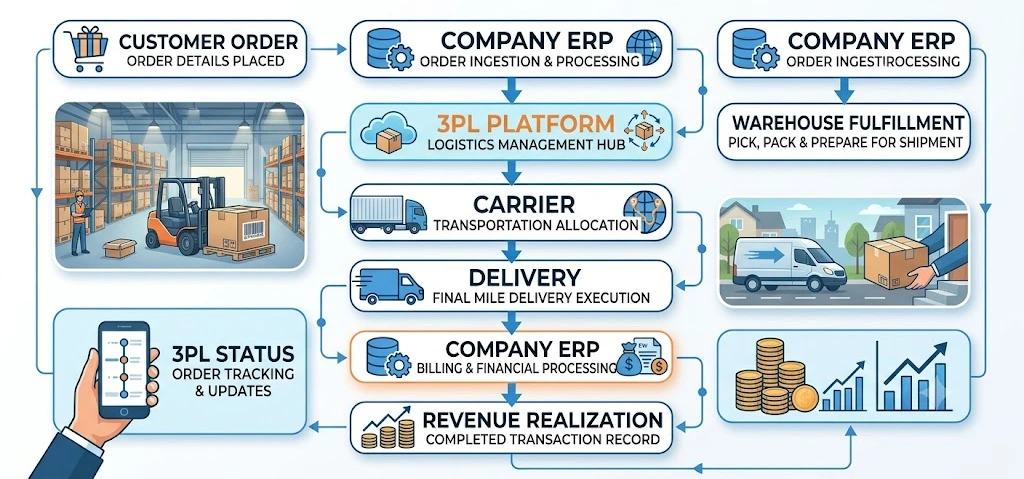
The company can then use the returned information for customer communication, inventory visibility, billing, and reporting.
This is much more efficient than exchanging spreadsheets every day.
Which Data Should Be Integrated?
One of the most important parts of an integration project is deciding what information should move between systems.
Not every field needs to be synchronized.
The integration should focus on business-critical data.
Order Data
Order information may include:
- Order number
- Customer
- Products
- Quantities
- Delivery address
- Requested delivery date
- Shipping instructions
- Priority
- Order status
Product and Master Data
Systems may need to exchange:
- SKU
- Product description
- Unit of measure
- Weight
- Dimensions
- Barcode
- Packaging information
- Product status
Inventory Data
Inventory integration can include:
- Available quantity
- Allocated quantity
- Warehouse
- Location
- Batch or serial information
- Stock status
- Inventory adjustments
Shipment Data
Shipment information may include:
- Shipment number
- Carrier
- Tracking number
- Service level
- Packages
- Weight
- Route information
- Shipment status
Delivery Data
Delivery updates may include:
- Pickup confirmation
- In-transit status
- Delivery attempt
- Delivered status
- Proof of delivery
- Delivery exception
Billing Data
Financial information can include:
- Freight charges
- Handling charges
- Warehouse service charges
- 3PL service fees
- Adjustments
- Invoices
- Credit notes
The important principle is to integrate the information required to support the business process, rather than attempting to synchronize every possible field.
How Can ERP Logistics Integration Be Implemented?
A successful integration requires more than connecting two APIs.
The company should first understand its processes, data ownership, systems, and integration requirements.
Step 1: Map the Logistics Process
Start with the complete operational journey.
For example:
Order → Warehouse → Shipment → Carrier → Delivery → Billing
Identify every system involved in each stage.
This makes it easier to understand where information is created and where it needs to go.
Step 2: Identify System Owners
Every data element should have a clear source.
For example:
- ERP may own customer master data.
- WMS may own warehouse task status.
- TMS may own transportation planning.
- Carrier may own shipment tracking.
- ERP may own financial records.
Without clear ownership, two systems may attempt to modify the same information and create conflicts.
Step 3: Define Integration Points
Next, determine exactly where systems need to exchange data.
For example:
ERP → WMS
Sales orders and fulfillment instructions.
WMS → ERP
Pick, pack, dispatch, and inventory updates.
ERP → TMS
Shipment requests and order information.
TMS → ERP
Carrier assignment, transportation status, and freight information.
ERP ↔ Carrier
Shipment creation, tracking, delivery status, and related information.
ERP ↔ 3PL
Orders, inventory, fulfillment, shipment, returns, and billing information.
Step 4: Choose the Integration Method
Different systems can be connected using different methods.
APIs
APIs are commonly used when systems need real-time or near-real-time data exchange.
They can allow one application to request information from another or send transactions automatically.
Webhooks
Webhooks can allow one system to notify another when a specific event occurs.
For example, a carrier may send an event when a shipment status changes.
EDI
Electronic Data Interchange can be useful when working with established supply chain partners that already operate using standardized electronic transactions.
File-Based Integration
CSV, XML, JSON, or other file-based exchanges may still be used in some environments.
This approach can be suitable for scheduled or batch-based processes, although it may provide less immediate visibility than real-time APIs.
The appropriate method depends on the systems involved, partner capabilities, transaction volume, security requirements, and business needs.
Real-Time vs Batch Integration
Not every logistics transaction needs real-time integration.
This is an important design consideration.
Real-time integration can be useful for information where timing is critical.
Examples include:
- Shipment tracking
- Order status
- Inventory availability
- Delivery exceptions
Batch integration may be suitable for information that does not require immediate updates.
Examples can include:
- Periodic reports
- Historical data
- Certain financial files
- Scheduled reconciliation
The goal should be to use the appropriate integration method for each business process rather than making every connection unnecessarily complex.
How to Handle Integration Errors
No integration environment is completely free from errors.
An API may become unavailable. A carrier may change its response format. A required field may be missing. A transaction may fail validation.
A good integration design therefore needs error handling.
The system should be able to identify:
- Failed transactions
- Missing data
- Duplicate records
- Invalid values
- Connection failures
- Authentication problems
- Unprocessed events
More importantly, the business should know what happens after an error.
For example, a failed shipment transaction should not simply disappear.
The system should retain the transaction, record the error, and provide a way to investigate or retry it.
Duplicate Data Is a Major Integration Risk
Duplicate records can create operational problems.
Imagine the same order being sent twice to a WMS.
The warehouse could potentially process the same request more than once.
This is why integration design should include unique identifiers and transaction controls.
Examples include:
- Order ID
- Shipment ID
- Purchase order number
- Tracking number
- Customer code
- SKU
The same business transaction should have a reliable reference across connected systems.
Integration Security Matters
Logistics integrations often exchange commercially important information.
This can include customer details, addresses, orders, inventory, shipment information, and financial data.
Security should therefore be considered from the beginning of the project.
Important areas can include:
- Authentication
- Authorization
- Secure data transmission
- API access controls
- User permissions
- Audit logs
- Credential management
- Monitoring
- Data retention
Security should not be treated as an afterthought once the integration is already live.
Common ERP Logistics Integration Challenges
Integration can create significant operational benefits, but poor planning can also create new problems.
Connecting systems without mapping the process
A technical connection does not automatically create a good business workflow.
The process should be mapped before the integration is developed.
Synchronizing too much data
Sending every available field between systems can make the integration unnecessarily complicated.
Focus on the information needed for the actual business process.
Unclear data ownership
If two systems both act as the source of truth for the same information, inconsistencies can occur.
Ownership should be defined clearly.
Ignoring exception scenarios
Most integration designs focus on successful transactions.
Real operations also include cancelled orders, short shipments, failed deliveries, rejected transactions, duplicate records, and system downtime.
These scenarios should be part of the design.
Building integrations that cannot scale
A connection that works for a few hundred transactions may behave differently at much higher volumes.
Transaction volume should therefore be considered during architecture planning.
How to Make ERP Logistics Integration More Scalable
A scalable integration architecture should be designed around business growth.
As the company adds warehouses, carriers, customers, 3PL partners, or logistics applications, the number of connections can increase.
A structured integration approach can help.
Instead of creating completely separate custom logic for every partner, businesses can define standardized data structures and reusable integration patterns.
For example, a carrier integration framework can make it easier to connect additional carriers using similar shipment and tracking workflows.
The same principle can apply to 3PL and WMS integrations.
This can reduce the effort required when the logistics network expands.
Where Does DuoCron ERP Fit Into Logistics Integration?
DuoCron ERP can act as the central business platform connecting core business processes with external logistics systems.
Its ERPNext and Frappe Framework foundation provides an open and configurable environment for building business workflows and integrations.
For logistics businesses, this can include integrations with:
- WMS platforms
- TMS platforms
- Carrier systems
- 3PL platforms
- E-commerce systems
- Customer portals
- Other business applications
The objective is not to force every logistics function into one application.
Instead, DuoCron can help create a connected architecture where each system performs the role it is designed to handle while business information remains synchronized.
Custom Integration Around Business Processes
Different companies have different integration requirements.
A distributor may need ERP-to-carrier integration.
A 3PL may need ERP-to-WMS and customer-system integrations.
A larger logistics operation may need ERP, WMS, TMS, multiple carrier, and 3PL connections.
DuoCron's custom-built approach allows integration requirements to be considered as part of the overall implementation rather than treated as an unrelated technical project.
This can be particularly useful when standard connectors do not fully match the company's process.
Why Integration Should Be Part of ERP Planning
Integration should not be considered after the ERP has already been implemented.
It should be included during the planning stage.
Before selecting or implementing an ERP, the company should document:
- Existing logistics applications
- Carriers
- WMS platforms
- TMS platforms
- 3PL partners
- EDI requirements
- API availability
- Data ownership
- Required transaction flows
- Reporting requirements
This creates a clearer picture of the technology environment.
It also helps prevent the ERP from becoming another isolated system.
ERP Logistics Integration Checklist
Before starting an integration project, logistics companies should review the following:
| Area | Key Question |
|---|---|
| Process | What information needs to move between systems? |
| Data Ownership | Which system is the source of truth? |
| Integration Method | Should the connection use API, EDI, webhook or files? |
| Frequency | Does the data need real-time or scheduled synchronization? |
| Security | How will systems authenticate and exchange data securely? |
| Error Handling | What happens when a transaction fails? |
| Duplicates | How will duplicate transactions be prevented? |
| Monitoring | How will integration health be tracked? |
| Scalability | Can the architecture support more partners and transactions? |
| Testing | How will integrations be tested before going live? |
This checklist can help businesses move from a basic system connection to a structured integration strategy.
Final Thoughts
ERP logistics integration is about much more than connecting software.
A logistics business may have an ERP, WMS, TMS, carrier systems, and 3PL partners, but the real value comes when these systems can exchange the right information at the right time.
ERP can manage the broader business process.
WMS can manage warehouse execution.
TMS can manage transportation planning and execution.
Carriers can provide shipment and delivery information.
3PL partners can provide outsourced logistics services and operational updates.
Integration connects these pieces.
A well-planned architecture can reduce duplicate data entry, improve visibility, support more accurate billing, reduce reconciliation work, and give teams better access to current operational information.
DuoCron ERP can provide a flexible business platform for companies that need to connect ERP processes with WMS, TMS, carriers, and 3PL partners. Its custom-built approach, ERPNext and Frappe Framework foundation, and support for integration-focused workflows allow businesses to design an ERP environment around their actual logistics network.
The most important step is to start with the process rather than the technology.
Map the flow. Define data ownership. Identify the required integration points. Choose the appropriate connection method. Plan for errors and security. Then build the architecture around how the logistics business actually operates.
That is what turns ERP logistics integration from a technical connection into a useful business system.
Frequently Asked Questions
1. What is ERP logistics integration?
ERP logistics integration connects an ERP with systems such as WMS, TMS, carrier platforms, and 3PL partner systems. It allows important information such as orders, inventory, shipments, tracking updates, delivery status, and billing data to move between systems with less manual intervention.
2. How does ERP integrate with a WMS?
An ERP can send orders, product information, and fulfillment instructions to a WMS. The WMS can then return information about picking, packing, inventory movements, dispatch, and fulfillment status. This keeps warehouse activity and ERP records synchronized.
3. Can an ERP integrate with multiple carriers?
Yes. An ERP can be connected with multiple carrier systems when the required APIs, EDI connections, or other integration methods are available. The integration can support shipment creation, tracking numbers, shipment status, delivery updates, and other relevant carrier information.
4. How does ERP integration with a 3PL work?
ERP-to-3PL integration allows a company to exchange orders, inventory information, fulfillment updates, shipment details, returns, and billing information with its logistics partner. This reduces dependence on spreadsheets and manual data exchange while improving visibility between the company and its 3PL.
5. Can DuoCron ERP integrate with WMS, TMS, carriers and 3PL systems?
DuoCron ERP can be configured and integrated with external business and logistics systems based on the required workflows and available integration interfaces. Built on ERPNext and the Frappe Framework, DuoCron supports a flexible approach where WMS, TMS, carrier, and 3PL systems can be connected to the broader ERP environment when required.
Related Articles:
10 Best Logistics ERP Software In The USA: 2026 Comparison
What Is ERP in Logistics? Features, Benefits and Examples
ERP for Freight Forwarding Companies: Complete Guide
Best ERP for Transportation and Logistics Companies
ERP for 3PL Companies: Warehouse, Billing and Customer Management
ERP vs TMS vs WMS: What Does a Logistics Company Need?
ERP for Cold-Chain Logistics and Temperature-Controlled Warehouses
How ERP Improves Inventory and Logistics Management
Open-Source ERP for Logistics: Features, Costs and Limitations
Author Bio

Aarav Sharma
Aarav Sharma is an ERPNext Consultant at DuoCron Solutions specializing in manufacturing ERP and process optimization. Outside work, Aarav enjoys exploring new technology trends and writing about digital transformation in manufacturing.