Inventory and logistics are closely connected. A company cannot manage logistics efficiently if it does not know what inventory it has, where that inventory is located, how much is available, and when it needs to move.
This is where ERP inventory and logistics management becomes important. An ERP connects inventory with purchasing, warehousing, sales, order fulfillment, transportation, finance, and reporting. Instead of managing each activity through separate spreadsheets or disconnected applications, businesses can create one connected flow of information.
DuoCron ERP provides a custom-built, industry-ready ERP approach that brings inventory and logistics processes together. Built on ERPNext and the Frappe Framework, it can be configured around warehouse structures, inventory workflows, procurement processes, order fulfillment, logistics operations, and integrations with external systems.
The result is a more connected way to manage stock from procurement to storage and from order processing to final delivery.
What Is ERP Inventory and Logistics Management?
ERP inventory and logistics management means using an integrated ERP system to manage inventory and the movement of goods across the supply chain.
It connects processes such as:
- Purchasing
- Goods receiving
- Inventory storage
- Stock transfers
- Warehouse management
- Order processing
- Picking and packing
- Dispatch
- Transportation
- Delivery
- Returns
- Inventory valuation
- Financial transactions
Instead of treating inventory as a separate activity, ERP connects it with the business transactions that create and consume stock.
A simple flow looks like this:
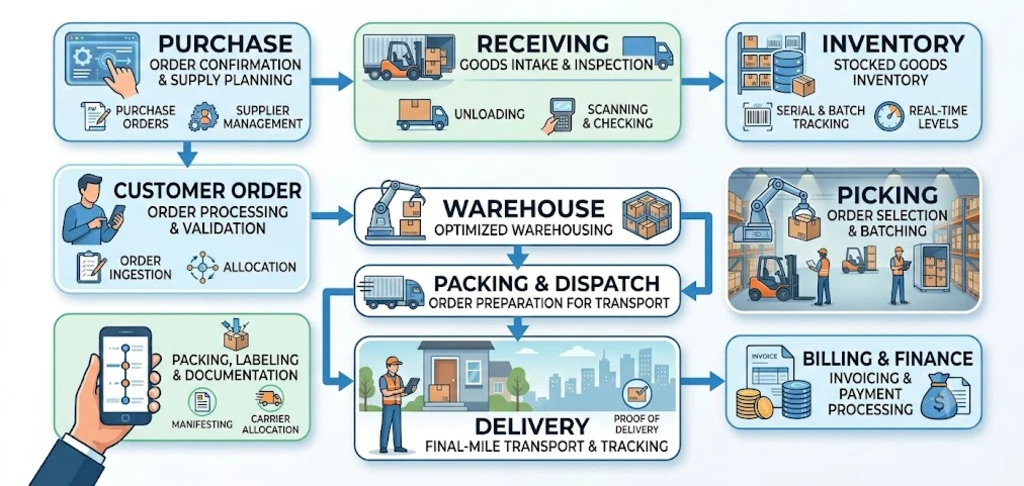
Each transaction can update the relevant business records.
Why Are Inventory and Logistics So Closely Connected?
Inventory does not remain in one place.
It moves between suppliers, warehouses, production facilities, distribution centers, stores, customers, and sometimes third-party logistics providers.
Every movement creates a logistics requirement.
For example, when a sales order is confirmed, the business needs to determine whether the required inventory is available.
If it is available, the warehouse needs to pick and pack it.
Then the logistics team needs to arrange dispatch.
Finally, the customer needs to receive the order.
A disconnected system can make these steps difficult to coordinate.
An integrated ERP creates a continuous information flow.
How ERP Improves Inventory Visibility
One of the biggest benefits of ERP inventory and logistics management is better inventory visibility.
A business should be able to answer basic questions quickly:
- How much stock do we have?
- Where is it located?
- How much is available?
- How much is already allocated?
- What stock is in transit?
- What inventory is on hold?
- What products are running low?
- Which items are moving slowly?
- What stock is approaching expiry?
When inventory data is spread across spreadsheets, warehouse systems, emails, and accounting software, answering these questions can take time.
An integrated ERP provides a central source for inventory transactions.
Real-Time Inventory Information
ERP can update inventory as transactions occur.
For example:
Purchase Receipt → Stock Increase
Sales Dispatch → Stock Reduction
Warehouse Transfer → Location Change
Customer Return → Stock Adjustment
This provides a more current view of inventory.
The exact timing depends on the ERP workflow and integrations, but the objective remains the same: inventory information should reflect actual business transactions as closely as possible.
ERP and Multi-Warehouse Inventory Management
Companies often operate more than one warehouse.
They may have:
- Regional warehouses
- Distribution centers
- Transit locations
- Production warehouses
- Finished-goods warehouses
- Spare-parts warehouses
- Retail stores
- Third-party warehouses
Managing these locations through separate spreadsheets can make inventory visibility difficult.
ERP allows businesses to maintain inventory by location while still having a consolidated view.
For example, management can understand both:
Total inventory across the business
and
Inventory available at each warehouse
This helps improve stock allocation and replenishment decisions.
How ERP Improves Warehouse Management
Inventory accuracy depends heavily on warehouse processes.
An ERP can connect warehouse transactions with purchasing, sales, inventory, and finance.
A typical warehouse flow can include:
Receiving → Inspection → Putaway → Storage → Picking → Packing → Dispatch
Each stage can generate a transaction or status update.
This makes it easier to maintain a consistent inventory record.
Receiving
When goods arrive, the warehouse needs to verify what was received.
ERP can connect the receipt with the original purchase order.
The process may include:
- Supplier verification
- Purchase order verification
- Product verification
- Quantity confirmation
- Batch or serial capture
- Quality checks where required
- Receipt posting
- Putaway
This reduces the gap between what was ordered and what was actually received.
Putaway
After receiving, inventory needs to be moved to the correct storage location.
ERP and WMS integration can help determine where stock should be stored.
This is particularly useful when warehouses contain multiple zones, racks, bins, or storage areas.
Picking
When a customer order is ready, warehouse teams need to locate and pick the correct products.
The ERP can provide the order information while the WMS or warehouse workflow manages the physical execution.
This creates a connection between:
Customer Order → Inventory Allocation → Picking → Packing → Dispatch
ERP Improves Inventory Accuracy
Inventory accuracy is not simply about counting stock.
It is about ensuring that the system reflects the physical inventory as closely as possible.
Inventory discrepancies can occur because of:
- Incorrect receiving
- Unrecorded stock movements
- Picking errors
- Damaged goods
- Returns
- Manual adjustments
- Wrong warehouse locations
- Duplicate transactions
- Delayed updates
An ERP can create transaction records for inventory movements and provide an audit trail.
This makes it easier to identify where discrepancies occurred.
Stock Transfers
Businesses frequently move inventory between locations.
For example:
Warehouse A → Warehouse B
Without an integrated system, the stock may appear unavailable at one location while still not appearing at the destination.
ERP can record the transfer as a business transaction.
This helps maintain visibility during internal movement.
ERP and Inventory Replenishment
Having inventory visibility is useful only if the business can act on it.
ERP can support replenishment planning by connecting inventory levels with procurement and demand.
Businesses can establish inventory rules around factors such as:
- Minimum stock
- Maximum stock
- Reorder levels
- Safety stock
- Lead times
- Historical demand
- Supplier availability
When stock reaches a defined threshold, the system can help trigger procurement or replenishment activity according to the company's workflow.
This reduces dependence on manually checking spreadsheets.
How ERP Connects Procurement With Inventory
Procurement directly affects inventory.
When a purchase order is created, the expected stock movement already exists in the business system.
A connected ERP can link:
Purchase Requisition → Purchase Order → Goods Receipt → Inventory → Supplier Invoice
This gives procurement and inventory teams a shared view.
For example, buyers can see expected incoming stock while warehouse teams can prepare for upcoming receipts.
Finance can also connect supplier invoices with purchasing and receiving transactions.
ERP and Demand Planning
Inventory problems often start with poor demand visibility.
If a company purchases too much, working capital gets tied up in excess stock.
If it purchases too little, customers may face delays.
ERP can bring historical sales, inventory, purchasing, and order information into a common environment.
This can support better demand and replenishment planning.
The ERP itself does not eliminate uncertainty in demand.
Instead, it provides better information for making planning decisions.
How ERP Improves Order Fulfillment
Order fulfillment connects inventory with logistics.
Once a customer places an order, the business needs to determine:
- Is the product available?
- Where is it located?
- Can it be allocated?
- When can it be picked?
- How should it be shipped?
- Which carrier should be used?
- When can the customer expect delivery?
An integrated ERP can connect these questions to the same order.
The process can look like:
Sales Order → Stock Availability → Allocation → Picking → Packing → Shipment → Delivery
This reduces the need for teams to move information manually between sales, warehouse, and logistics systems.
ERP and Transportation Management
Inventory does not create value until it reaches the right destination.
Transportation is therefore an important part of logistics management.
ERP can connect shipment information with customer orders and inventory transactions.
Depending on the company's architecture, the ERP may integrate with a TMS or carrier platform.
For example:
ERP Order → Shipment Request → TMS → Carrier → Tracking → Delivery Update → ERP
This allows transportation activity to remain connected with the original business transaction.
ERP and Carrier Integration
Many companies work with multiple carriers.
Each carrier may have its own system, tracking process, service levels, and pricing.
ERP integration can connect shipment information with carrier systems.
Potential data exchanges include:
- Shipment details
- Customer information
- Delivery address
- Package information
- Weight
- Carrier
- Tracking number
- Shipment status
- Delivery confirmation
- Freight charges
This can improve shipment visibility without requiring employees to manually update every system.
ERP and 3PL Logistics
Third-party logistics providers are another important part of modern supply chains.
A 3PL may manage:
- Warehousing
- Picking
- Packing
- Transportation
- Returns
- Fulfillment
If the 3PL uses its own systems, the company's ERP needs a way to exchange relevant information.
An integrated flow can look like:
ERP → 3PL → Warehouse Fulfillment → Shipment → Delivery → ERP
Information such as orders, inventory updates, shipment details, returns, and service charges can be exchanged according to the agreed workflow.
This gives the business better visibility into outsourced logistics operations.
ERP and Inventory Traceability
Traceability becomes particularly important when businesses handle regulated, serialized, or batch-controlled products.
ERP can maintain relationships between inventory transactions.
For example:
Supplier → Purchase Receipt → Batch → Warehouse → Sales Order → Shipment → Customer
This creates a traceable transaction history.
If a product issue occurs, the company can use this information to identify affected inventory and transactions.
Traceability can also support internal audits, quality processes, customer inquiries, and recall workflows where applicable.
ERP and Serial Number Management
For products that require serial-level tracking, ERP can maintain individual item identities.
This can be useful for:
- Electronics
- Machinery
- Equipment
- Spare parts
- Medical products
- High-value goods
The system can associate a serial number with relevant purchasing, inventory, sales, warranty, and service transactions.
This creates a more complete product history.
ERP and Batch Management
Batch management is useful when inventory is handled in groups with shared characteristics.
The ERP can associate batches with:
- Receiving
- Manufacturing
- Storage
- Quality checks
- Sales
- Shipment
- Returns
For businesses with expiry-sensitive inventory, batch tracking can also support expiry management and FEFO processes.
How ERP Reduces Inventory Carrying Costs
Excess inventory ties up capital.
It also creates additional costs for:
- Storage
- Handling
- Insurance
- Damage
- Obsolescence
- Expiry
- Warehouse space
ERP does not automatically eliminate excess inventory.
However, better visibility can help businesses make more informed decisions.
For example, management can identify:
- Slow-moving products
- Excess inventory
- Low-stock items
- Open purchase orders
- Inventory already in transit
- Overstocked locations
This can support better procurement and inventory planning.
How ERP Helps Reduce Stockouts
Stockouts can affect both revenue and customer relationships.
A product may be unavailable because demand was underestimated, replenishment was delayed, or inventory information was inaccurate.
ERP can help by connecting:
Demand → Inventory → Procurement → Receiving → Fulfillment
This allows businesses to see expected inventory and pending procurement activity alongside current stock.
With better information, teams can respond earlier to potential shortages.
ERP and Inventory Reporting
A major advantage of integrated ERP is the ability to connect operational transactions with reporting.
Useful inventory and logistics reports can include:
- Inventory by warehouse
- Inventory by product
- Stock movement
- Inventory aging
- Slow-moving inventory
- Stock valuation
- Open purchase orders
- Goods in transit
- Order fulfillment
- Dispatch status
- Delivery performance
- Inventory adjustments
The specific reports required depend on the business model.
The important point is that the reports are based on connected transactional data rather than manually combined spreadsheets.
ERP Dashboards for Inventory and Logistics
Management often needs information quickly.
An ERP dashboard can bring important indicators into one view.
For example:
Inventory
- Current stock
- Available stock
- Allocated stock
- Low-stock items
- Slow-moving stock
Warehouse
- Pending receipts
- Pending picks
- Pending dispatches
- Warehouse utilization
Logistics
- Shipments in transit
- Delayed shipments
- Pending deliveries
- Carrier activity
Procurement
- Open purchase orders
- Expected receipts
- Supplier performance
This gives decision-makers a broader operational picture.
How ERP Improves Logistics Coordination
Logistics involves several teams.
Sales creates orders.
Procurement manages suppliers.
Warehouse teams manage inventory.
Logistics teams coordinate transportation.
Finance manages invoices and payments.
Customer service communicates with customers.
Without shared information, each team may work from a different version of the transaction.
ERP creates a common business record.
For example, everyone can work around the same customer order while seeing the information relevant to their role.
This reduces communication gaps.
ERP and Reverse Logistics
Logistics does not end when an order is delivered.
Products may be returned because of:
- Damage
- Wrong product
- Customer rejection
- Warranty
- Quality issues
- Delivery problems
- Commercial returns
ERP can connect the return with the original order and inventory transaction.
A typical flow can be:
Customer Return → Inspection → Return Approval → Inventory Update → Credit / Replacement
This makes reverse logistics part of the same connected business process.
How ERP Supports Logistics Cost Management
Logistics costs can come from multiple areas.
These may include:
- Freight
- Warehousing
- Handling
- Packaging
- Carrier charges
- 3PL fees
- Returns
- Inventory carrying costs
When logistics transactions are connected with finance, businesses can analyze costs more effectively.
For example, freight charges can be associated with shipments and customer orders.
Warehouse service costs can be associated with the relevant operational activity.
This provides a clearer financial view of logistics.
ERP Inventory and Logistics: One Connected Flow
The real value of ERP comes from connecting individual processes.
A complete flow might look like:
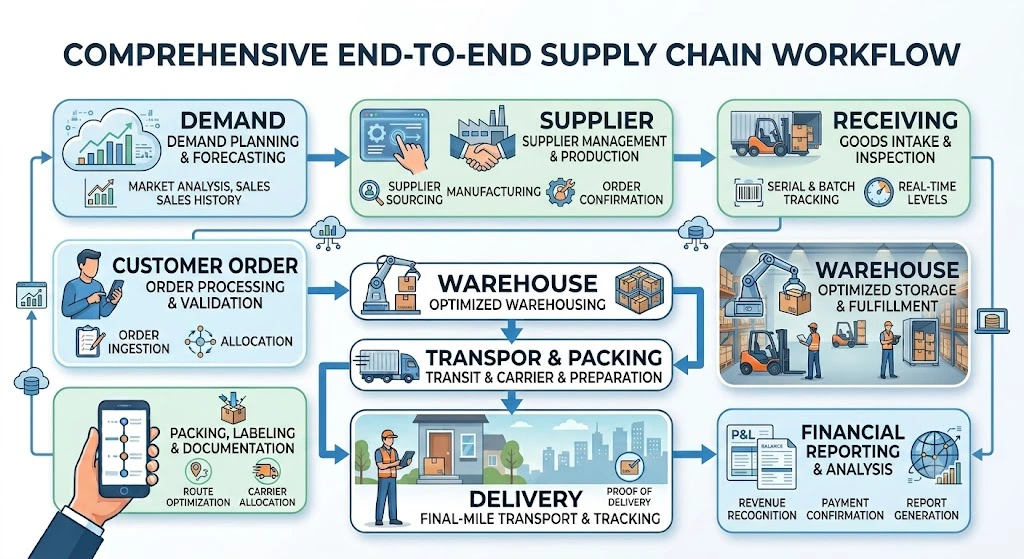
Instead of treating each stage as an independent activity, ERP connects them through common business transactions.
How to Implement ERP for Inventory and Logistics
A successful implementation should begin with business processes rather than software screens.
Step 1: Map the Current Process
Document how inventory currently moves.
Identify:
- Suppliers
- Warehouses
- Storage locations
- Customers
- Carriers
- 3PLs
- Existing WMS or TMS systems
- Manual processes
Step 2: Identify Inventory Problems
Look for issues such as:
- Stock discrepancies
- Overstock
- Stockouts
- Delayed receipts
- Poor warehouse visibility
- Manual data entry
- Slow reporting
- Shipment tracking problems
These issues help define implementation priorities.
Step 3: Define the Data Structure
Create clear definitions for:
- Products
- Warehouses
- Locations
- Customers
- Suppliers
- Units of measure
- Batches
- Serial numbers
- Carriers
- Inventory statuses
Good master data is essential for reliable ERP operations.
Step 4: Connect External Systems
Identify which systems need integration.
This could include:
- WMS
- TMS
- Carrier platforms
- 3PL systems
- E-commerce platforms
- Supplier portals
- Customer portals
APIs, EDI, webhooks, and other integration methods can be used depending on the environment.
Step 5: Test End-to-End Transactions
Do not test only individual screens.
Test complete business scenarios.
For example:
Purchase Order → Receipt → Inventory → Sales Order → Pick → Dispatch → Delivery → Invoice
This reveals integration and process problems before go-live.
Common Inventory and Logistics ERP Mistakes
Choosing software before mapping the process
Businesses sometimes select an ERP based only on feature lists.
The actual operational workflow should come first.
Treating inventory and logistics as separate departments
Inventory and logistics are connected.
The ERP should reflect that relationship.
Ignoring warehouse complexity
Multiple locations, bins, zones, batches, serial numbers, and transfers should be considered during implementation.
Underestimating integrations
The ERP may need to connect with carriers, WMS, TMS, 3PLs, e-commerce systems, or other platforms.
These requirements should be planned early.
Poor master data
Incorrect product, customer, supplier, or warehouse data can undermine an otherwise good ERP implementation.
Measuring only inventory quantity
Businesses should also consider availability, allocation, movement, aging, cost, and fulfillment status.
Why DuoCron ERP for Inventory and Logistics?
DuoCron ERP is designed around a flexible, business-first ERP approach.
Its ERPNext and Frappe Framework foundation provides an open environment that can be configured and integrated according to business requirements.
For inventory and logistics operations, DuoCron can support connected workflows across:
- Procurement
- Inventory
- Warehousing
- Sales
- Order fulfillment
- Transportation
- Carrier coordination
- 3PL operations
- Finance
- Reporting
The platform can also be integrated with specialized WMS and TMS systems where those applications are required.
Custom-Built for Actual Business Processes
Not every logistics company operates in the same way.
One business may operate five warehouses and a small carrier network.
Another may have multiple distribution centers, 3PL partners, regional carriers, and complex fulfillment workflows.
A rigid ERP may require the business to change its processes around the software.
DuoCron follows a custom-built, industry-ready approach designed to fit the ERP around the business process.
This is particularly useful when standard ERP workflows do not cover specific operational requirements.
No Recurring Per-Seat Software Licensing Fees
DuoCron also offers a different approach to ERP software costs.
Instead of relying on recurring per-user software licensing fees, businesses can invest in implementation, customization, integrations, hosting, and support according to their requirements.
This can provide a more transparent way to plan the overall ERP investment, particularly for organizations with larger user groups.
When Should a Business Consider ERP for Inventory and Logistics?
There is no single company size at which ERP becomes necessary.
However, businesses often start considering an integrated ERP when inventory and logistics become difficult to manage manually.
Common signs include:
- Multiple warehouses
- Increasing SKU counts
- Frequent stock discrepancies
- Growing order volumes
- Manual inventory reports
- Spreadsheet-based purchasing
- Poor shipment visibility
- Multiple logistics partners
- Difficulty tracking stock across locations
- Increasing returns
- Slow financial reconciliation
- Limited management visibility
If different teams are maintaining separate spreadsheets to understand the same inventory, it may be time to consider a more connected system.
The Future of ERP Inventory and Logistics
Inventory and logistics management is becoming increasingly connected.
ERP systems are working with WMS, TMS, carrier platforms, e-commerce systems, supplier portals, analytics platforms, and automation technologies.
The future is not simply about collecting more inventory data.
It is about connecting information with business actions.
A low-stock alert should support replenishment.
A new customer order should trigger fulfillment activity.
A warehouse dispatch should update inventory.
A carrier delivery should update the shipment.
A customer return should update inventory and finance.
This connected model can make inventory and logistics management more responsive.
Final Thoughts
Inventory and logistics cannot be managed effectively when important information is scattered across disconnected systems.
A modern ERP can connect purchasing, inventory, warehouses, sales orders, transportation, delivery, returns, and finance into one operational flow.
The biggest benefit of ERP inventory and logistics management is not simply having another software system.
It is having better visibility into where inventory is, how it is moving, what needs to be replenished, what orders are waiting for fulfillment, and what is happening across the logistics network.
For businesses with growing warehouse and logistics operations, an integrated ERP can provide a stronger foundation for inventory accuracy, order fulfillment, procurement planning, logistics coordination, and financial visibility.
DuoCron ERP provides a custom-built, industry-ready approach based on ERPNext and the Frappe Framework. It can be configured around the company's actual inventory and logistics processes and integrated with WMS, TMS, carrier, 3PL, and other business systems where required.
The objective is simple: connect inventory with logistics so that the business can move the right products, through the right channels, at the right time, with better visibility and control.
Frequently Asked Questions
1. How does ERP improve inventory management?
ERP improves inventory management by connecting purchasing, receiving, warehouse movements, sales orders, picking, dispatch, returns, and financial transactions. This creates better visibility into stock levels, locations, allocations, movements, and inventory value.
2. How does ERP improve logistics management?
ERP connects logistics activities with orders, inventory, warehouses, carriers, transportation systems, customers, and finance. This helps businesses coordinate shipments, monitor fulfillment, manage logistics costs, and maintain a connected transaction history.
3. Can ERP manage inventory across multiple warehouses?
Yes. ERP can maintain inventory by warehouse and storage location while also providing a consolidated view across the organization. This can help businesses manage transfers, replenishment, allocation, and stock availability across multiple locations.
4. Can ERP integrate with WMS, TMS and 3PL systems?
Yes. An ERP can integrate with WMS, TMS, carrier, 3PL, e-commerce, and other systems using APIs, EDI, webhooks, or other integration methods. DuoCron ERP can be configured around these integration requirements.
5. Why is DuoCron ERP useful for inventory and logistics management?
DuoCron ERP provides a custom-built, industry-ready approach based on ERPNext and the Frappe Framework. It can connect inventory, procurement, warehouse, order fulfillment, logistics, finance, and external systems while avoiding recurring per-seat software licensing fees.
Related Articles:
10 Best Logistics ERP Software In The USA: 2026 Comparison
What Is ERP in Logistics? Features, Benefits and Examples
ERP for Freight Forwarding Companies: Complete Guide
Best ERP for Transportation and Logistics Companies
ERP for 3PL Companies: Warehouse, Billing and Customer Management
ERP vs TMS vs WMS: What Does a Logistics Company Need?
How to Integrate ERP With Carriers, TMS, WMS and 3PL Partners
ERP for Cold-Chain Logistics and Temperature-Controlled Warehouses
Open-Source ERP for Logistics: Features, Costs and Limitations
How Logistics ERP Handles Returns and Reverse Logistics
Logistics ERP Implementation Checklist for US Companies
Author Bio

Aarav Sharma
Aarav Sharma is an ERPNext Consultant at DuoCron Solutions specializing in manufacturing ERP and process optimization. Outside work, Aarav enjoys exploring new technology trends and writing about digital transformation in manufacturing.