ERPNext AI Agents for purchase help turn business instructions into structured purchasing records within an ERPNext-powered solution. Receipt-related Agents can support another defined record-creation task, provided the organization establishes exactly which receipt document is involved and what information it requires.
For medium and large manufacturers, these capabilities address recurring work across purchasing, stores, and finance. Their value depends on accurate inputs, clear responsibilities, and review of the resulting records.
DuoCron ERP, powered by ERPNext, offers AI Agents that create purchase and receipt records alongside sales and quotations. Its manufacturing-focused approach makes it a strong option for businesses seeking practical automation within connected ERP processes.
With 11+ years of experience, 300+ successful implementations, and experience delivering complex government projects, DuoCron ERP brings an established implementation background to organizations operating at medium and large scale.
This guide explains how to structure the workflow, prepare the necessary information, and validate records before the business relies on them.
How ERPNext AI Agents for Purchase Fit Into Manufacturing Work
Purchasing begins with a business need. The organization requires materials, components, services, or other inputs to support its operations.
Employees must translate that need into the appropriate purchasing record using the correct supplier, items, quantities, and commercial details.
An AI Agent can participate in this record-creation activity. The proposed workflow should identify the exact document it creates and how that document fits into the wider process.
For DuoCron ERP Software, purchase record creation is an identified capability. The precise supported document types and actions should be confirmed in the implementation scope.
That clarity matters because a purchase order, supplier invoice, and receipt record represent different events.
A useful ERPNext purchase automation workflow makes those distinctions visible while reducing repetitive entry for the employee.
Define the Scope of ERPNext AI Agents for Purchase Before Use
Start with a plain description of the task.
Identify the document to be created, the information required, the responsible user, and the expected status of the resulting record.
Then describe what happens next. Another employee may need to review commercial terms, authorize a commitment, or validate an operational event.
Document creation should have a clear endpoint. Users need to know which work the Agent completes and which responsibilities remain with the business.
This gives purchasing, stores, and finance a shared understanding of the proposed capability.
First, Clarify What “Receipt” Means
The word “receipt” can refer to different business events.
A goods receipt concerns items physically received. A financial receipt concerns money received. These require different information and have different effects within the ERP.
DuoCron ERP's stated capability includes receipt record creation, but the exact supported receipt document has not been specified here.
Confirm that document during solution discussions. Do not assume that receipt functionality covers every receiving or payment-related record.
In standard ERPNext workflows, a Purchase Receipt records incoming goods, while a Payment Entry can record money received or paid, depending on the transaction.
These platform documents explain the distinction; they do not establish which one a particular Agent supports.
A precise document definition prevents teams from designing a workflow around the wrong assumption.
Separate the Business Events in the Purchasing Cycle
Manufacturers need to distinguish a purchasing commitment from physical receipt, supplier billing, and settlement.
In ERPNext, a purchase order records the commitment to buy. A Purchase Receipt records goods received. A Purchase Invoice records the supplier bill, while a Payment Entry records the relevant payment transaction.
The configured process determines how these documents connect.
Creating one record does not prove that the other events have occurred.
For example, preparing a purchasing commitment does not establish that materials have arrived. Recording a supplier invoice does not by itself prove that a bank payment has been completed.
This distinction is essential when introducing AI.
The Agent’s task should correspond to a real, supported business event, with evidence provided by the responsible team.
Begin With an Approved Purchasing Requirement
A clear purchasing instruction starts with a requirement the business understands.
The employee should know what is needed, why it is needed, and which process authorizes the request.
For a manufacturer, the requirement might relate to production materials, replacement components, packaging, or an approved service.
The Agent should not be assumed to decide whether the business needs the purchase merely because it can create a record.
Demand assessment, supplier selection, and spending authorization may remain separate responsibilities.
The implementation should define the information that must be available before record creation begins.
Where a source document is relevant, establish whether the supported Agent workflow can reference it and how the link is validated. Do not assume that a document number mentioned in an instruction is automatically connected to the output.
Identify the Correct Supplier and Buying Entity
Supplier identity requires more than a familiar name.
A manufacturer may work with several supplier entities or maintain separate records for branches, currencies, or commercial relationships.
Use an unambiguous supplier reference where practical.
Also identify the company making the purchase. In a multi-entity organization, choosing the correct supplier while using the wrong buying company still creates an unsuitable record.
The workflow should explain how these values are selected and reviewed.
Some information may come from approved master records or configuration. Other details may require explicit user input.
For AI Agents for ERPNext procurement, the important outcome is a record that reflects the intended commercial relationship. Employees should be able to inspect that relationship before continuing.
Make Item Identity and Units Clear
Purchasing instructions often use supplier descriptions, internal item names, or abbreviated references.
These may not identify the same product unambiguously.
For discrete manufacturers, a component with a different dimension or specification can affect production suitability. For process manufacturers, a material grade or concentration can be equally significant.
The record should use the approved item that represents the requirement.
Quantity and unit also need attention. A supplier may sell in packs, containers, or weight units different from the manufacturer’s stock unit.
The ERP setup must represent the relevant relationship correctly.
Ask how the proposed Agent workflow handles these details and what the employee must provide. A correct number with the wrong unit does not represent a correct purchasing requirement.
Establish Commercial Inputs Without Granting Unintended Authority
A purchasing record may require rates, currency, delivery expectations, and other commercial information.
The organization should define where those values come from.
They may be supplied through an approved instruction, drawn from configured information, or completed through an authorized review.
An Agent should not be assumed to negotiate terms, select a supplier, or approve an exceptional price unless those capabilities are specifically included and demonstrated.
For DuoCron ERP, the identified capability is record creation. Keep that task connected to the purchasing authority already defined by the business.
Employees should understand whether the output is ready for review or whether further information is required.
This allows automation to support purchasing work while preserving responsibility for commercial decisions.
An Example of a Clear Purchasing Instruction
The following example illustrates the information needed to describe a purchasing task. It is not a guaranteed DuoCron ERP command format or confirmation that every field can be populated by the Agent.
“Create the supported purchase record for buying company Plant Division using approved supplier SUP-025. Include 400 units of ITEM-410 for the approved requirement, with the agreed commercial inputs, and prepare the record for review.”
The actual instruction should match the supported document and implementation.
If the commercial terms, delivery location, or relevant dates are unclear, the user needs to resolve them through the agreed process.
The purpose is to provide reliable references and a clear intended action.
During a DuoCron ERP discussion, use a representative requirement to establish how the Agent accepts information and what it creates.
Receipt Instructions Need Evidence of the Underlying Event
Receipt-related automation should begin with verified business information.
For physical goods, the responsible team needs to establish what arrived and how it should be recorded. For a financial receipt, finance needs evidence of the relevant money movement and its intended allocation.
An instruction alone does not establish that an event occurred.
The implementation should define who supplies the evidence and who validates it.
This is particularly important when different departments use the word “received” differently. Purchasing may mean a supplier confirmation, stores may mean physical arrival, and finance may mean a recorded payment.
A dependable ERPNext receipt workflow resolves that ambiguity before the Agent creates the supported record.
If the Supported Receipt Records Incoming Goods
Where the agreed Agent capability creates a goods-receipt document, its inputs need to reflect the physical event.
Relevant information may include the supplier, source reference, item, actual quantity, receiving location, and other configured requirements.
Some manufacturers also need batch, serial, or quality-related information. Whether the Agent can populate those fields must be established explicitly.
The receipt should reflect verified quantities rather than automatically assuming that everything ordered arrived.
Partial deliveries, damaged goods, and rejected quantities need an agreed handling process.
Standard ERPNext provides a Purchase Receipt document for incoming goods, but the Agent’s exact support for that document and its fields must be confirmed.
The business should also understand when the document’s stock and accounting effects occur under the configured workflow.
If the Supported Receipt Records Money Received
Where the agreed capability concerns a financial receipt, a different set of information is relevant.
Finance may need to identify the company, party, amount, currency, payment date, account context, and applicable transaction references.
The exact fields and supported actions depend on the proposed implementation.
Do not treat a reference to an invoice as sufficient evidence that the money has arrived. Finance needs its approved verification process.
Likewise, creating a financial record should not be assumed to initiate or confirm an external bank transaction.
ERPNext’s Payment Entry supports payment and receipt recording in its standard financial workflows. Whether that document is part of system, receipt Agent scope still needs confirmation.
Keeping these distinctions clear helps finance evaluate the capability accurately.
Handle Partial Events and Outstanding Balances Carefully
Manufacturing purchasing frequently involves partial deliveries or staged activity.
An order may be fulfilled over several shipments. The received amount may differ from the invoiced amount. Payments may follow a separate schedule.
These events should remain distinguishable.
Where the supported Agent workflow references an earlier record, verify how it identifies the relevant lines and quantities.
Ask how employees inspect the balance remaining and how corrections are handled.
Do not assume that the Agent independently reconciles every purchasing, receipt, billing, and payment event.
Standard ERPNext can track connected purchasing documents, but the specific Agent action needs its own scope.
The practical goal is an accurate record of the current event without losing visibility into what remains outstanding.
Validate the Created Record Before Its Next Business Step
Review should focus on the meaning and consequences of the document.
For purchasing records, confirm the supplier, buying company, items, quantities, units, commercial inputs, and relevant references.
For receipts, first confirm the document type, then inspect the information appropriate to that event.
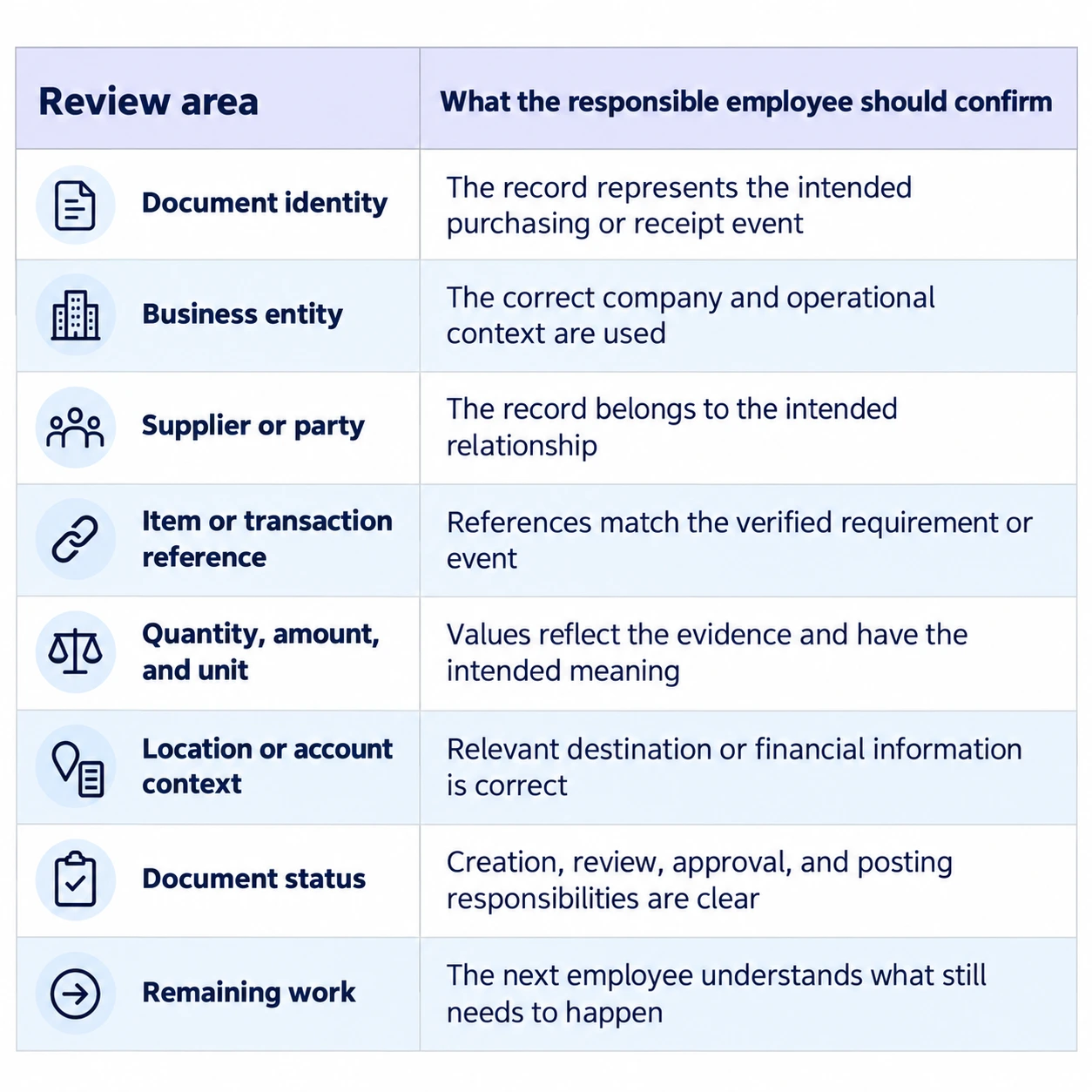
The table describes review needs. It does not imply that every listed value is populated automatically.
Keep Creation, Submission, and Approval Distinct
A created record can be at a different stage from an authorized business transaction.
Ask the implementation team to identify the status produced by each supported Agent action.
Who reviews it? Who submits it where applicable? Which approvals are required? What happens if the record is incorrect?
The answers should reflect the configured workflow.
For purchasing, this preserves authority over business commitments. For receipt-related documents, it helps prevent uncertainty about whether an event has been posted or merely prepared.
Use representative employee roles to test the process.
An unrestricted demonstration account may not reveal the access behavior that matters in normal operation. Confirm that the proposed Agent workflow fits the organization’s intended responsibilities.
Prepare for Ambiguous Instructions and Interrupted Requests
Missing supplier references, unclear units, and incomplete event information are realistic operating conditions.
The workflow needs a supported response to them.
Confirm whether the Agent asks for clarification, stops the action, or uses another defined method. Users should know whether a partial record exists.
Interrupted requests deserve similar attention.
If an employee loses the connection or receives a delayed response, how do they check whether creation completed?
Agree on a practical checking procedure before repeating the instruction.
Do not assume that duplicate prevention is automatically included. Verify the actual behavior and document how employees avoid accidental repetition.
These details make ERPNext purchase and receipt automation easier to use confidently during daily work.
Connect Records With Production Needs Without Overstating AI Scope
Purchasing and receiving affect manufacturing, but creating their records does not establish every downstream outcome.
A purchasing record does not guarantee supplier delivery. A recorded receipt does not necessarily mean material has passed every quality requirement or is available for every production purpose.
The configured manufacturing process determines those relationships.
Identify the relevant handovers between purchasing, stores, quality, production, and finance.
For example, the business may need to distinguish physical arrival from quality acceptance. It may also need clear communication about material availability.
Ask how the ERP configuration represents those states.
The Agent’s role should be described precisely within that process. Supplier-risk prediction, autonomous replenishment, and production optimization should be treated as separate requirements if proposed.
Introduce the Workflow Through a Focused Business Scope
Begin with one well-understood purchasing or receipt task.
Choose representative records and users who can judge the result. Establish the inputs, required master data, review responsibilities, and supported exception handling.
Then test the complete task.
Include a normal instruction, a realistic variation, and a missing or ambiguous detail. Inspect the resulting records and follow the next relevant business step.
For medium and large manufacturers, also verify entity and location context.
Use the findings to refine the process before expanding to more departments or facilities.
The objective is a repeatable operating method that employees understand. A successful example becomes more valuable when the organization knows how it behaves under ordinary variations.
Working With DuoCron ERP on Purchasing and Receipt Automation
DuoCron ERP, powered by ERPNext, offers a manufacturing-focused foundation with AI Agents for creating purchase and receipt records.
A useful discussion begins with the exact business event you want to support.
Share your document requirements, supplier structure, item references, locations, approval responsibilities, and receipt meaning.
Ask DuoCron ERP Software to demonstrate the supported task and identify any configuration or development required.
The underlying ERPNext platform also has no per-user software licensing fees. Implementation, hosting, support, integrations, and AI-related services remain part of the commercial discussion.
A clear scope connects the proposed automation with the way your organization purchases, receives, and reviews business activity.
Conclusion
ERPNext AI Agents for purchase provide practical value when they turn clear business instructions into accurate records within an agreed workflow.
Receipt automation requires an equally precise definition. Establish whether the task concerns goods, money, or another supported receipt document, then validate it against the underlying event.
DuoCron ERP, powered by ERPNext, offers AI Agents that create purchase and receipt records alongside sales and quotations.
Discuss your purchasing and receipt requirements with DuoCron ERP to establish the supported documents, inputs, and review process.
Contact - sales@duocron.com | www.duocron.com
Frequently Asked Questions
1. What do ERPNext AI Agents for purchase do?
In DuoCron ERP, powered by ERPNext, AI Agents create purchase records from business instructions. Confirm the exact supported document types, required inputs, output status, and subsequent review responsibilities in the implementation scope.
2. Does receipt automation always mean a Purchase Receipt?
No. “Receipt” can refer to incoming goods or a financial receipt, among other business meanings. Confirm the exact receipt document supported by the proposed Agent before designing the workflow.
3. What information is needed for a purchase record?
The required inputs depend on the document and configuration. They may include the buying company, supplier, items, quantities, units, commercial details, and relevant source references. Some values may come from approved master data.
4. Can an AI Agent confirm that goods have arrived?
Record creation should rely on verified event information supplied through the agreed process. An Agent should not be assumed to verify physical arrival or quality acceptance unless a separate capability is explicitly included and demonstrated.
5. Does creating a purchasing record automatically approve it?
That should not be assumed. Creation, submission, and approval are separate actions. The proposed configuration should identify who performs each action and which status the Agent produces.
6. How should manufacturers evaluate DuoCron ERP’s receipt functionality?
First confirm the exact document supported. Then use a representative event, inspect the created record, verify its status, and test a realistic exception. Include the responsible purchasing, stores, or finance users according to the receipt type.
Related Articles and Resources
- Understand the broader process of turning business instructions into records through our guide to AI Agents in ERP, including required inputs, validation, and human control.
- Prepare reliable supplier, item, unit, and location information with our ERP data readiness checklist for manufacturing AI workflows.
- Keep purchasing decisions distinct from transaction preparation by exploring AI in ERP procurement for supplier evaluation, lead times, and purchase risks.
- Clarify who can create, review, and authorize business records with our guide to AI ERP security and governance.
- See how purchasing and receiving activities connect with material availability and production requirements in our article on AI in ERP for supply chain management.
- Evaluate whether the workflow reduces total handling effort while preserving record accuracy using our manufacturing pilot scorecard for AI ERP ROI.
Author Bio

Aarav Sharma
Aarav Sharma is an ERPNext Consultant at DuoCron Solutions specializing in manufacturing ERP and process optimization. Outside work, Aarav enjoys exploring new technology trends and writing about digital transformation in manufacturing.