AI Agents in ERP are software capabilities that interpret business instructions and use permitted system actions to complete supported tasks. Their work can include creating a quotation, preparing a purchase record or recording a receipt. The result is an actual ERP document that employees can inspect and use within the business process.
For medium and large manufacturers, these capabilities address a familiar problem: employees repeatedly translate known business requirements into structured transactions. An agent can reduce that preparation effort when the necessary information, system connections and controls are in place.
DuoCron ERP, powered by ERPNext, provides AI Agents that create sales, purchase, quotation and receipt records.
What Are AI Agents in ERP?
An ERP AI Agent connects a business request to a supported action within the enterprise system.
A request might identify a customer, items and quantities for a quotation. The agent uses the available information and its permitted tools to carry out the supported task. The completed result should be visible as a record in the ERP, with an identifiable document type and status.
The word “agent” does not mean unrestricted authority. Each implementation has boundaries: which records it can access, which documents it can create and which actions remain outside its scope.
For a manufacturer, these boundaries are essential to understanding the feature. “An agent handles purchasing” is a broad claim. “An agent creates a supported purchase document from supplied details” describes a capability that can be demonstrated and evaluated.
The usefulness of ERP AI Agents therefore depends on their actual task coverage and execution quality, rather than the number of processes mentioned in a product description.
How Business Instructions Become ERP Transactions
Record creation involves more than understanding a sentence. An ERP document needs valid references, required fields and the correct business context.
A customer’s familiar trading name may differ from the name stored in the system. An item may have several variants. A quantity may require a specific unit of measure. These details must be resolved correctly before the resulting transaction can be trusted.
A well-designed agent workflow connects interpretation with controlled execution. The exact sequence varies by implementation, but the business responsibilities remain recognisable.
How AI Agents in ERP Move from Request to Record
The process begins when an authorised user supplies the information required for a supported task. The agent identifies the intended action and works with the relevant ERP context.
The workflow then needs to resolve the document’s required details. This can involve matching existing records, checking that supplied values are valid and identifying information that is still missing.
Only after the necessary checks should the supported creation action proceed. The result should identify the record created and make its status clear.
This sequence is a useful evaluation model. Manufacturers should ask providers to show how their implementation handles each stage, including situations where the request cannot be completed.
The Information an Agent Needs
Business instructions work best when they contain enough detail to identify the intended transaction.
For a quotation, that may include the customer, the relevant items, quantities and required commercial information. A purchase document will involve different references and may depend on the company’s purchasing configuration.
Some information may come from existing ERP records or approved defaults. However, a default is appropriate only when it represents the intended business requirement. An agent should not silently treat uncertainty as permission to choose a commercial detail.
The manufacturer should establish which information employees must supply and which information the workflow can retrieve reliably.
This creates a more predictable operating experience. Employees know what a complete request looks like, and reviewers know which details require attention.
An agent’s ability to interpret language can make interaction easier, but it does not remove the need for precise business information.
Why Master Records Matter
Customers, suppliers and items provide the identity behind a transaction. If these records are inconsistent, an instruction can become difficult to interpret safely.
Consider two items with similar descriptions but different specifications. Selecting the wrong one may produce a document that looks complete while representing the wrong business requirement.
The same issue can arise with suppliers that have several legal entities or customers with multiple billing arrangements. A name match alone may be insufficient.
Before expanding AI agents for ERP transactions, manufacturers should review the master records used by the selected workflow. The objective is to remove avoidable ambiguity and define how uncertain matches are handled.
This preparation also benefits employees using conventional ERP screens. Clear records improve the underlying process regardless of how a document is created.
What Transaction Creation Actually Means
An important distinction exists between preparing information, creating a record and completing a business process.
An agent may organise the required details without saving a document. Another implementation may create a draft record. A further supported action may move that record to a later stage.
These are different capabilities and should be described separately.
For manufacturers, the document’s state matters because downstream activities may depend on it. A saved quotation is not necessarily approved for release. A created purchase document does not automatically establish that the company has authorised the commitment.
The evaluation should therefore answer a straightforward question: what exactly exists in the ERP after the agent finishes?
The response should identify the document type, its reference and its status. This gives employees something concrete to verify before proceeding.
Supported Business Applications in DuoCron ERP
DuoCron ERP provides AI Agents that create sales, purchase, quotation and receipt records.
These capabilities offer practical starting points because they connect to recurring business activities. Their value can be assessed through the documents produced and the effort required to reach an acceptable result.
The following applications describe the confirmed categories. Exact document types and operating behaviour should be established during a workflow-specific demonstration.
Quotations
Quotation creation requires a correct representation of the customer’s request.
An AI Agent can create the quotation record from the required business information. Employees can then review the document against the intended items, quantities and commercial details.
This can reduce repetitive preparation, especially where sales teams handle recurring requests. However, creation capability should not be interpreted as independent authority to determine margins, negotiate terms or approve discounts.
Those responsibilities need to remain explicit within the company’s commercial process.
Sales Records
Sales transactions connect customer requirements to the rest of the ERP environment.
DuoCron ERP’s AI Agents can create supported sales records. The manufacturer should verify which documents are included and what information is needed for each one.
The resulting record must represent the intended business transaction accurately. Customer identity, item selection and quantities remain important even when the preparation method changes.
A demonstration should show the actual saved record so that sales and operational employees can assess whether it fits their work.
Purchase Records
Purchase document preparation often involves recurring combinations of suppliers, items and quantities.
An agent can reduce the effort required to create supported purchase records from supplied instructions. The business should still define how the document is reviewed and who has authority to approve the purchasing commitment.
The relevant benefit is easier transaction preparation within the agreed process. Supplier selection, budget ownership and purchasing authority should not be assumed from record-creation capability alone.
Receipt Records
Receipt creation also requires a precise understanding of the document involved.
A stock receipt and a payment receipt represent different events. They have different inputs, operational effects and review requirements.
It supports receipt documents & should therefore be identified explicitly during evaluation. The demonstration should use the receipt category relevant to the manufacturer’s intended workflow.
This avoids a common misunderstanding in feature discussions: a general term being interpreted as coverage of several different processes.
Handling Missing or Ambiguous Information
Real business requests are not always complete.
An employee may omit a required detail, refer to an item informally or provide information that conflicts with an existing record. These situations are important tests of an agent workflow.
The manufacturer should establish whether the implementation requests clarification, reports the missing information or stops without creating a record. It should also be clear how employees resume the task after resolving the issue.
An incorrect assumption can be more costly than an explicit pause. A document that appears finished may move through the business before anyone notices that it reflects the wrong requirement.
For this reason, exception handling should be part of the demonstration. Providers should explain the behaviour supported by their implementation rather than rely only on successful examples.
Permissions Define What an Agent May Do
Access to ERP information carries business responsibility.
An employee may be allowed to create a document but not approve it. Access may also be restricted by company, department or other operating context.
An agent integration needs an explicit permission design. Manufacturers should understand which identity the system uses to perform actions and how that authority relates to the employee initiating the request.
ERPNext and the Frappe framework provide foundations for authenticated access and role-based controls. Their existence does not automatically establish that every custom agent applies them appropriately.
The implementation should be tested against the intended boundaries. An employee should not gain broader authority merely because a request is submitted through an AI capability.
Detailed access configuration belongs in a security assessment, but buyers should verify this basic principle before adopting transaction-creating agents.
Approval Remains a Separate Business Decision
An AI Agent can reduce document preparation effort while the organisation retains its existing approval responsibilities.
This separation is valuable in medium and large manufacturers, where transactions may pass through several levels of review. Preparing the record and authorising the commitment serve different purposes.
ERPNext supports configurable approval workflows. An agent-enabled implementation should establish how created documents interact with those workflows and which transitions are supported.
For example, the business may want the agent-created record to remain available for review before any further action occurs. Whether that is the configured behaviour must be confirmed in the proposed solution.
Manufacturers should ask to see the document’s state after creation and the responsibility for its next step. Clear answers prevent uncertainty during everyday use.
Preventing Duplicate and Uncertain Transactions
A request may occasionally be interrupted by a connection issue or delayed response.
The employee then needs to know whether the transaction was created. Repeating the request without checking can create duplicate work or, depending on the implementation, a duplicate record.
A dependable workflow needs a defined way to identify the outcome. Buyers should ask how the solution reports completion, handles retries and helps users inspect the record before trying again.
Duplicate prevention should also consider normal business repetition. Two similar customer requests may be legitimate, while the same instruction submitted twice by mistake may not be.
The appropriate handling depends on the process. It should be designed and tested rather than assumed to exist because the system uses AI.
What Changes for Employees?
Employees spend less time on repetitive preparation when an agent can complete the supported creation steps reliably.
Their work shifts towards providing clear requirements, reviewing the result and resolving exceptions. This can make better use of their knowledge of customers, suppliers and operational priorities.
However, the review effort should remain visible. If employees must correct most created records, the workflow may not be delivering the expected benefit.
Training should explain how to make a complete request, where to inspect the resulting document and when to use the established manual process.
For AI-driven ERP workflows, adoption depends on confidence built through repeated, understandable results. Employees need to know both the capability and its limits.
Why This Matters for Medium and Large Manufacturers
Growing transaction volumes can place pressure on sales coordination, purchasing and other administrative teams.
The challenge is often repeated handling of information that employees already understand but must translate into structured documents.
Agent-enabled creation can help address that preparation burden where the workflow is suitable. Its usefulness increases when the result fits the needs of the next department without additional clarification.
For a manufacturer operating across several sites, the system must also preserve the correct operating context. Company, location and other relevant details should be resolved according to the selected document and configuration.
Businesses in India and the US should test their own document requirements and terminology. A general demonstration does not establish suitability across every entity, location or transaction category.
A Practical Evaluation Example
Consider a manufacturer receiving a quotation request for existing items from an established customer.
The employee provides the required details through the supported interaction method. The agent creates the quotation, and the employee opens the saved record to verify the result.
The evaluation should then go beyond that successful case. Repeat the scenario with an unclear item reference or missing required information. Check how the workflow responds and whether the employee can understand the next step.
Finally, inspect the document status and confirm who is responsible for review.
This example is an evaluation scenario rather than a customer outcome claim. Its purpose is to show how a business can examine execution quality without relying on a broad promise of automation.
Measuring the Benefit Without Guesswork
The business should compare the complete effort required to produce an acceptable record.
Start with the current process. Measure preparation and review using representative examples, including any existing templates or integrations.
Then assess the agent workflow using comparable cases. Include the time spent providing instructions, checking the record and correcting errors.
A useful evaluation can track several measures:
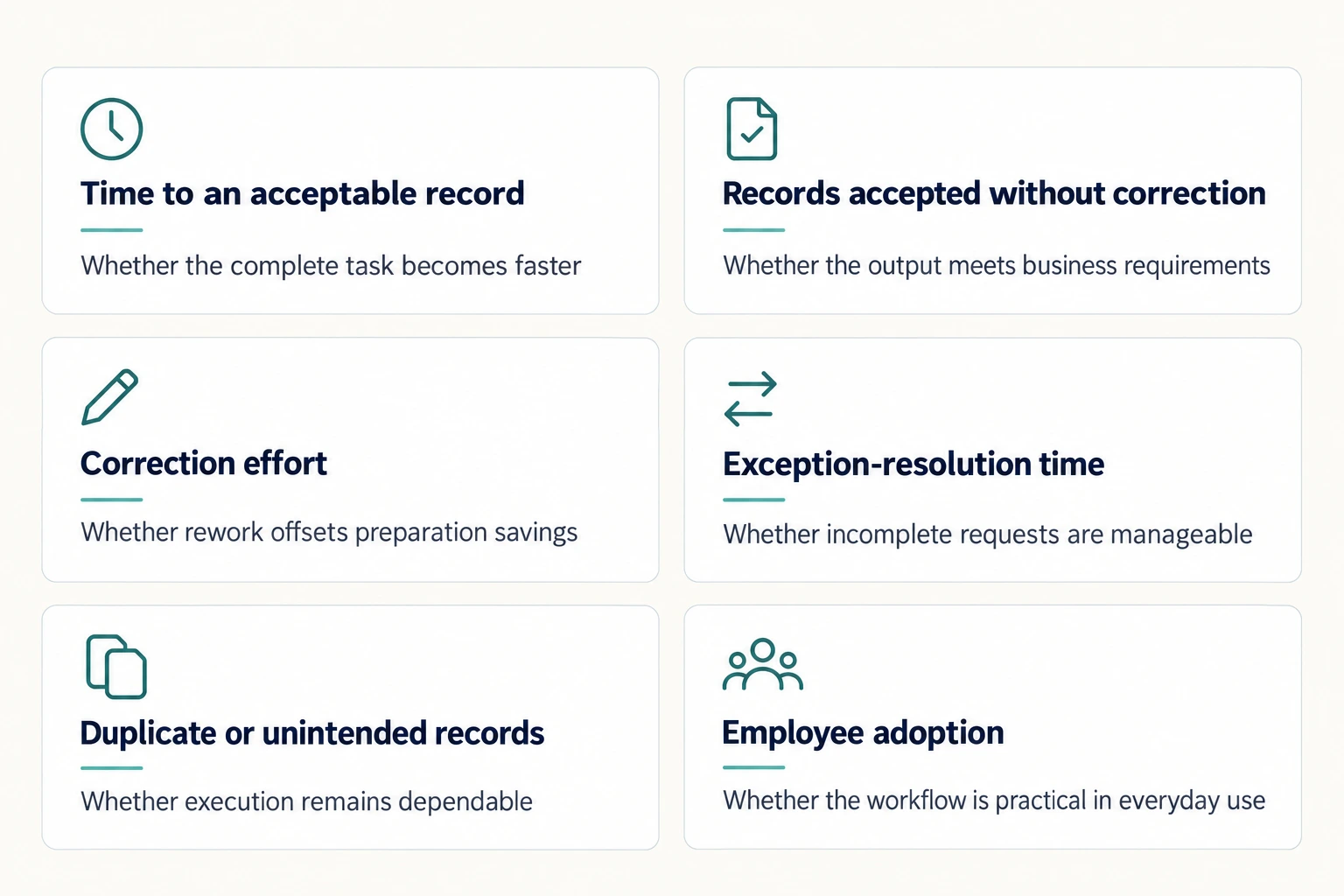
These measures should be interpreted together. A quick workflow that creates frequent corrections may be less useful than a slightly slower one that produces dependable records.
Introducing Agents Without Disrupting Operations
A focused initial scope makes evaluation easier.
Choose one supported document category and a defined group of users. Establish the necessary records, expected inputs and review responsibility before testing.
Include normal variations in the pilot. A single successful request is insufficient evidence that the workflow is ready for broad use.
Employees should retain a clear way to complete essential work if the agent cannot perform a task or is temporarily unavailable. The purpose is to improve operations while maintaining continuity.
Expand after the workflow meets agreed criteria. This allows the manufacturer to address data issues, clarify instructions and build confidence before introducing further transaction categories.
Why the ERPNext Foundation Matters
ERPNext provides the business application environment in which records and processes are managed. Its underlying Frappe framework offers APIs for accessing and creating supported records.
That technical foundation can help connect an AI Agent to the ERP, but an API is not an agent by itself. Interpretation, task boundaries, validation and outcome handling still require implementation.
For manufacturers, the relevant result is the complete business workflow.
DuoCron ERP, powered by ERPNext, combines its ERP implementation approach with AI Agents for sales, purchase, quotation and receipt creation. Buyers can evaluate these capabilities against actual transaction requirements rather than infer functionality from the availability of an integration interface.
ERPNext-specific sales and purchasing demonstrations should examine the detailed records and fields relevant to those workflows.
Choosing an Implementation Partner
A capable partner should explain what the agent can create, what it needs and how employees verify the result.
Manufacturing experience matters because a document can affect several departments. A choice made during record preparation may influence downstream inventory, commercial or financial activity.
For medium and large manufacturers, the discussion should connect that experience to the proposed scope. Ask how requirements will be mapped, how the workflow will be tested and what ongoing support will cover.
The strongest basis for selection is a combination of implementation capability and demonstrated fit with the manufacturer’s actual process.
Conclusion:
Evaluate Agents Through the Records They Create
AI Agents in ERP make business automation tangible by performing supported actions within the enterprise system.
Their value depends on whether they create the intended record, handle uncertainty appropriately and preserve the responsibilities around review and approval. Accurate master data, clear inputs and measurable outcomes remain central to success.
For medium and large manufacturers, DuoCron ERP, powered by ERPNext, offers AI Agents that create sales, purchase, quotation and receipt records. Backed by 11+ years of experience, 300+ successful implementations and experience with complex government projects.
Request a demonstration using one of your recurring transactions. Inspect the created record and evaluate the full process from instruction to review.
Contact - sales@duocron.com | www.duocron.com
Frequently Asked Questions
1. What are AI Agents in ERP?
AI Agents in ERP interpret business instructions and use supported system actions to perform tasks. Their capabilities may include creating transaction records. Each implementation has defined document coverage, data requirements and permission boundaries.
2. Can AI Agents create quotations and purchase records?
Yes, where those actions are supported by the implementation. DuoCron ERP, powered by ERPNext, provides AI Agents for creating sales, purchase, quotation and receipt records. Exact document types and required inputs should be verified during a demonstration.
3. Does creating a record mean the transaction is approved?
No. Creation, approval and submission can be separate stages. Manufacturers should confirm the status of the agent-created document and identify who has responsibility for reviewing and authorising its next step.
4. What happens if a business instruction is incomplete?
The behaviour depends on the implementation. A suitable workflow should identify missing or uncertain information and provide a clear resolution path. Buyers should test these cases and verify that the system does not create unintended records from unsupported assumptions.
5. Are AI Agents useful for medium and large manufacturing businesses?
They can be useful where recurring transaction preparation consumes employee time. Suitability depends on document coverage, transaction complexity, data quality and controls. A focused pilot should measure the complete effort needed to produce acceptable records.
6. How should a manufacturer evaluate an ERP AI Agent?
Use realistic instructions and inspect the resulting ERP documents. Test missing information, ambiguous references, permission boundaries and interrupted requests. Measure preparation, review and correction together before deciding whether to expand the workflow.
Related Articles and Resources
- Understand how interpreting instructions differs from predicting future outcomes through our comparison of generative AI vs predictive AI in ERP.
- See how customer requirements become reviewable commercial records in our guide to ERPNext AI Agents for sales and quotations.
- Explore the inputs, document distinctions, and validation involved in ERPNext AI Agents for purchase and receipt records.
- Prepare clear customer, supplier, item, and unit information using our ERP data readiness checklist for AI.
- Clarify the permissions, approval responsibilities, and evidence needed around Agent actions through AI ERP security and governance.
- Evaluate whether an Agent reduces total preparation, review, and correction effort with our guide to measuring AI ERP ROI through a manufacturing pilot.
Author Bio

Aarav Sharma
Aarav Sharma is an ERPNext Consultant at DuoCron Solutions specializing in manufacturing ERP and process optimization. Outside work, Aarav enjoys exploring new technology trends and writing about digital transformation in manufacturing.